Some features are temporarily disabled while we perform website maintenance. We'll be back to full capacity shortly.
Fire Find by Francesco De Stefano
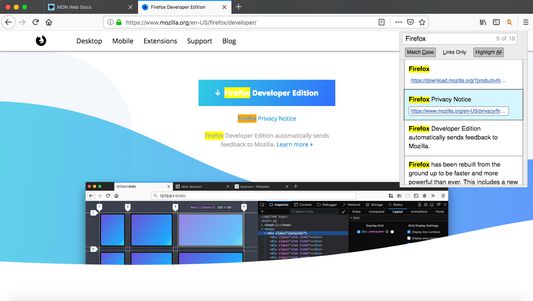
Quick Find features. Search results in one location. Navigate to links in just a few keystrokes.
10 Users10 Users
Extension Metadata
Screenshots
About this extension
- Fire Find
===========
### Description
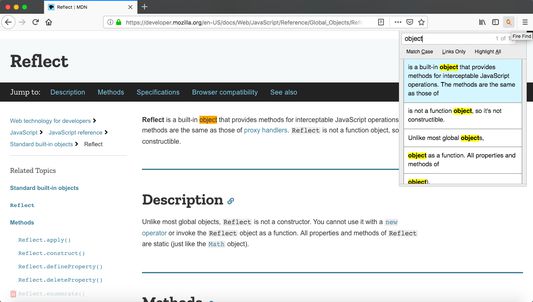
Text search tool for your Browser web page *
* Note: the menu can be activated when the web page is loaded
### Find features
- Case match.
- Links only search.
- Highlight all.
- search selected text.
- Scroll/navigate through all search results with context.
### Shortcut keys
- "ctrl + shift + o" to open fire find menu
- "esc" escape key will close menu *
- single quote key will open menu in links mode *
- "up" or "down": navigate results by using up or down arrow keys *
- "enter" or "return" *: pressing enter on highlighted menu with link will navigate to the link
- "alt + a": toggle highlight all results mode *
- "alt + c": toggle match case mode *
- "alt + l": toggle links mode *
* Disabled since release 0.1.2 (22.08.2019) for security reason
### Limitations
- WebExtension only works on sites that allow content scripts.
- Fire Find does not search through view-source code of webpage.
- Other website shortcuts or WebExtensions may conflict with the above shortcuts.
- Keyboard shortcuts doesn't work in Firefox for Android.
Open Source project - https://sourceforge.net/projects/find-in-webpage/
===========
### Description
Text search tool for your Browser web page *
* Note: the menu can be activated when the web page is loaded
### Find features
- Case match.
- Links only search.
- Highlight all.
- search selected text.
- Scroll/navigate through all search results with context.
### Shortcut keys
- "ctrl + shift + o" to open fire find menu
- "esc" escape key will close menu *
- single quote key will open menu in links mode *
- "up" or "down": navigate results by using up or down arrow keys *
- "enter" or "return" *: pressing enter on highlighted menu with link will navigate to the link
- "alt + a": toggle highlight all results mode *
- "alt + c": toggle match case mode *
- "alt + l": toggle links mode *
* Disabled since release 0.1.2 (22.08.2019) for security reason
### Limitations
- WebExtension only works on sites that allow content scripts.
- Fire Find does not search through view-source code of webpage.
- Other website shortcuts or WebExtensions may conflict with the above shortcuts.
- Keyboard shortcuts doesn't work in Firefox for Android.
Open Source project - https://sourceforge.net/projects/find-in-webpage/
Rated 4.4 by 5 reviewers
Permissions and data
More information
- Add-on Links
- Version
- 1.0.1
- Size
- 331.83 KB
- Last updated
- 4 years ago (Apr 21, 2022)
- Related Categories
- License
- MIT License
- Version History
- Add to collection
The developer of this extension asks that you help support its continued development by making a small contribution.